Skip to content

Victoria Island, Lagos

The fees office that keeps every family's account straight.

Collect term fees, issue numbered receipts, follow arrears and hand every parent a clear statement — from Creche to SSS 3.

Your currency, integer minor units A4 and thermal receipts Role-based access

Creche → SSS 3

One school, every section and arm.

One ledger per student

Billed, paid, discounted, outstanding.

A4 + 80mm

Receipts that print properly at the desk.

Currency-ready

Integer minor units, no rounding drift.

How it works

From the gate to the receipt in three steps.

01

Add the student

Quick entry captures the admission number, class, guardian and phone. The active term is assigned automatically.

02

Take the payment

Cash, transfer or POS. Allocate part or all of the balance, add a discount, and the ledger updates in one transaction.

03

Hand over proof

Print A4 or thermal, email the receipt, or print a full statement. Every receipt has a sequential number.

Inside the fees office

Real screens from the working app.

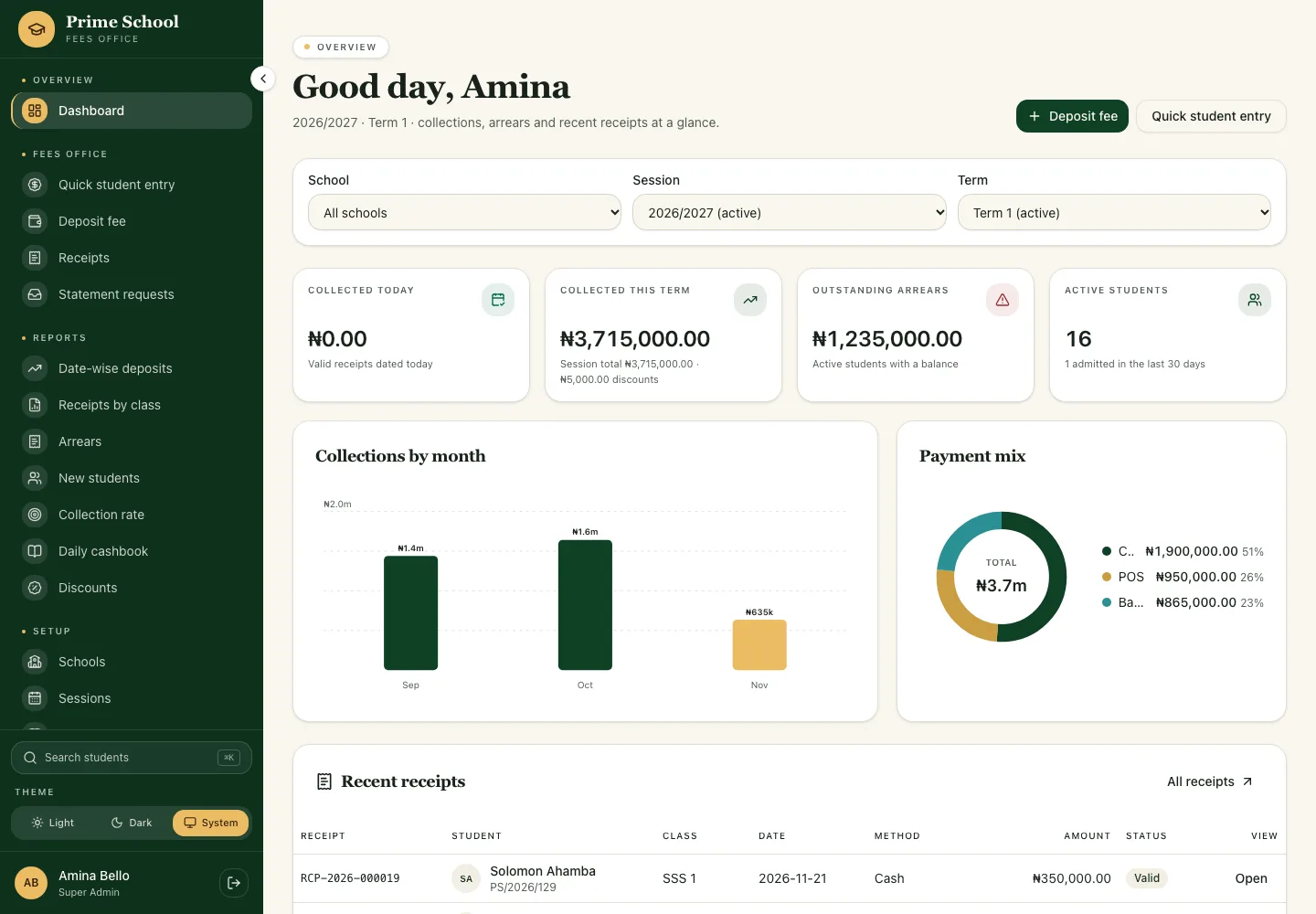
Captured from the local demo: the dashboard, the arrears report and a numbered receipt.

Prime School fees dashboard with term KPIs, monthly collections and recent receipts

The dashboard: collected this term, arrears, active students and the latest receipts.
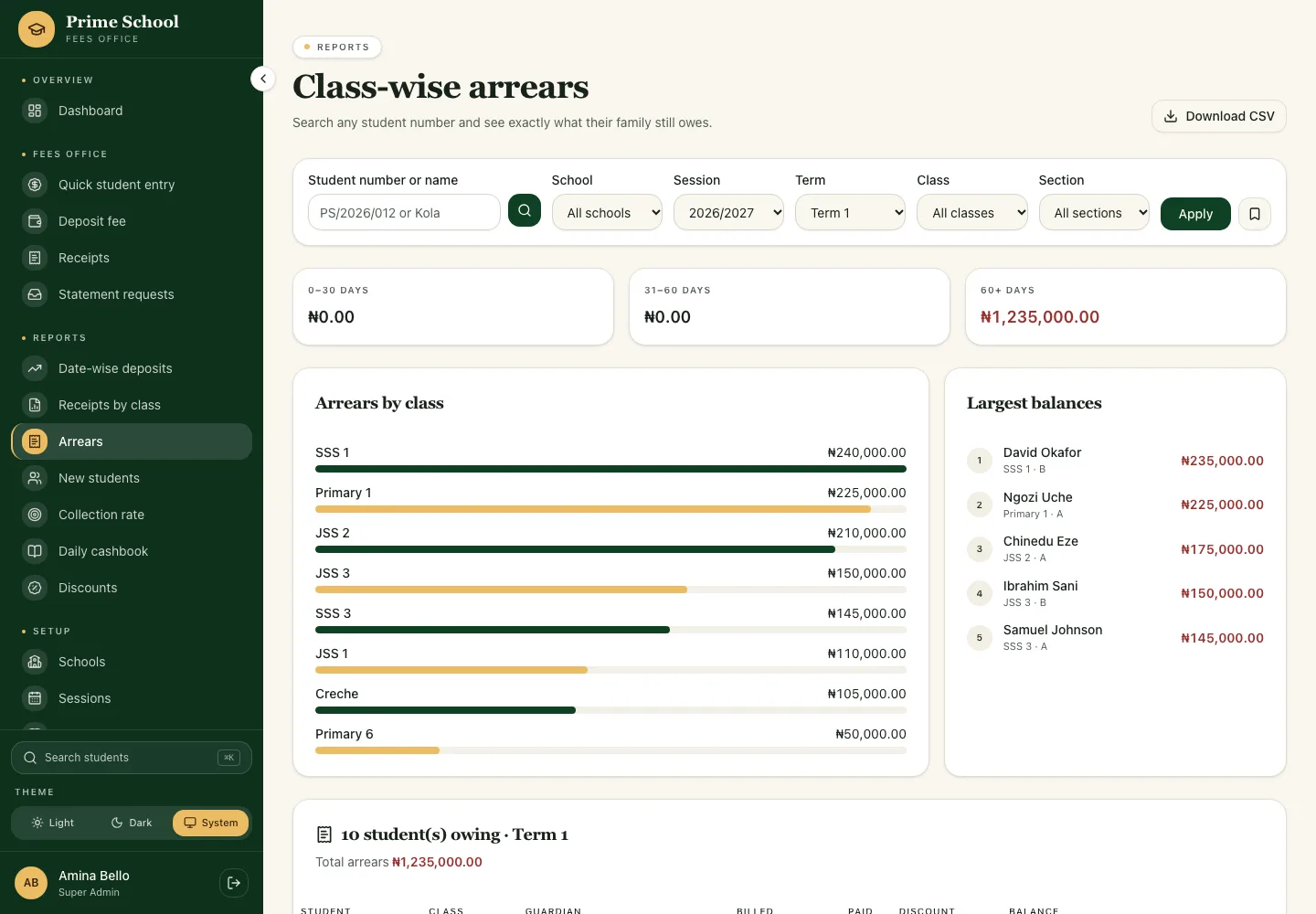
Prime School arrears report with 0 to 30, 31 to 60 and 60 plus day aging

Arrears by class, with aging buckets and a WhatsApp reminder on every row.
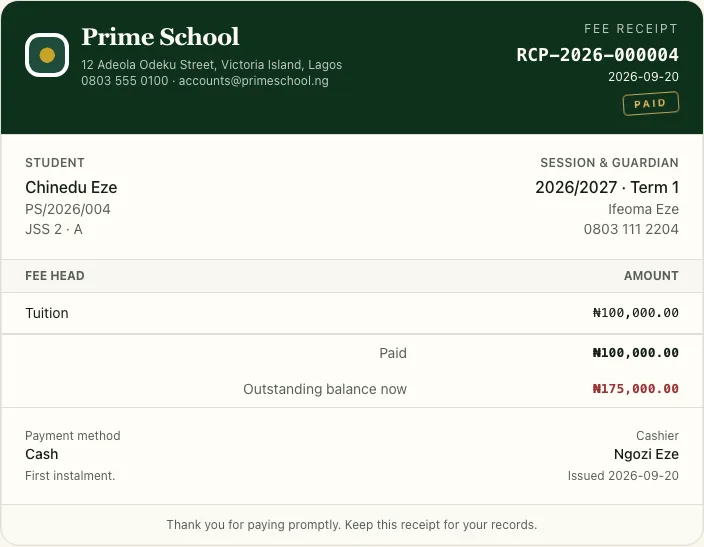
Prime School numbered fee receipt with student, fee head and outstanding balance

A numbered receipt, ready for A4 or thermal print.

The shape of a term

One term, from fee card to promotion.

01

Start of term

Publish the fee card for every class, add new students and roll forward any unpaid balances.

  • Fee cards by class
  • New admissions
  • Brought-forward arrears
02

During the term

Take cash, transfer or POS payments, part or full, and issue a numbered receipt each time.

  • Part payments & discounts
  • A4 or thermal receipts
  • Email to the guardian
03

End of term

Print statements, review arrears, clone the fee card and promote the class into the next session.

  • Parent statements
  • Arrears by class
  • Promotion & carry-forward

Receipts & records

A receipt the bursary can defend.

Every payment gets a sequential number, a snapshot of the fee heads and the cashier who took it. If something is wrong, a Super Admin cancels it — the receipt stays on the ledger as VOID. Nothing is quietly deleted.

  • Sequential receipt numbers
  • Audited edits and cancellations
  • Printable parent statements
  • Excel-ready CSV reports

Reports

Class-wise arrears

CSV
JSS 1
1,240,000
JSS 2
910,000
JSS 3
640,000
SSS 1
420,000
Primary 1
310,000
Total arrears3,520,000

Numbers that reconcile

Reports the auditor can trust.

Filter by date, school, class or payment method. The same numbers feed the screen and the CSV, so nobody has to rebuild the picture in a separate spreadsheet.

  • Date-wise deposits
  • Receipts by class
  • Class-wise arrears
  • New students

CSV files open cleanly in Excel with a UTF-8 BOM and whole-naira amounts.

What is inside

Built around how a school actually collects fees.

Termly fee cards

Set tuition, development levy, books and optional extras per class — then clone the card into the next term.

Arrears you can see

Class-wise and section-wise balances, with a search by student number and an Excel-ready export.

Roles that fit

Super Admins configure, Fee Clerks collect, Auditors read. Every correction is written to an audit log.

Promotion that carries balances

Move a class into the next session and carry unpaid fees forward as an opening arrears charge.

Parent statements

Billed, paid, discounted and outstanding — one clean statement a guardian can read without help.

Backups and exports

Download a database backup or any report as CSV. Nothing important depends on one laptop.

Who does what

Three roles. One clear boundary.

Super Admin

Configures the school, fee cards, sessions and staff, and handles corrections.

  • Masters & fee cards
  • Receipt corrections
  • Promotions and backups

Fee Clerk

Works the desk: finds students, takes payments and hands over proof.

  • Quick student entry
  • Deposit fee
  • Print or email receipts

Auditor

Reads ledgers, statements and every report without changing a record.

  • Student ledgers
  • Four reports
  • CSV exports
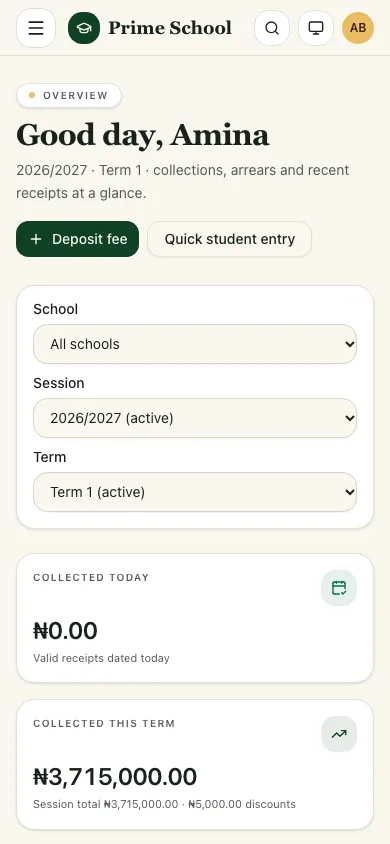
Prime School fees dashboard on a phone, showing term KPIs and recent receipts

At the desk or on the move

The bursary desk fits in a phone.

The same ledgers, search and deposit screen collapse into a fast mobile layout. Clerks can take a payment at the gate without waiting for a desktop.

  • Search any student in seconds
  • Partial payments and discounts
  • Print or email the receipt
  • Light and dark themes

Questions

Answers for the bursary.

Who can sign in?

Staff only. Super Admins configure the school, Fee Clerks record payments, and Auditors get read-only access to ledgers and reports.

Can parents log in?

Not in this version. Parents receive a printed or emailed receipt, and the bursary can print a full fee statement on request.

Which payment methods are supported?

Cash, bank transfer and POS are recorded at the desk. Paystack references can also be stored against a receipt.

What happens if a receipt is wrong?

A Super Admin cancels it with a reason. The receipt stays on the ledger as VOID with zero financial weight, and the change is audited.

Ready for the next term

Give the bursary one clear place to collect, receipt and reconcile.

Staff can sign in with the account issued by the school administrator. Parents can request a statement from the bursary.